Text size
Line height
Text spacing
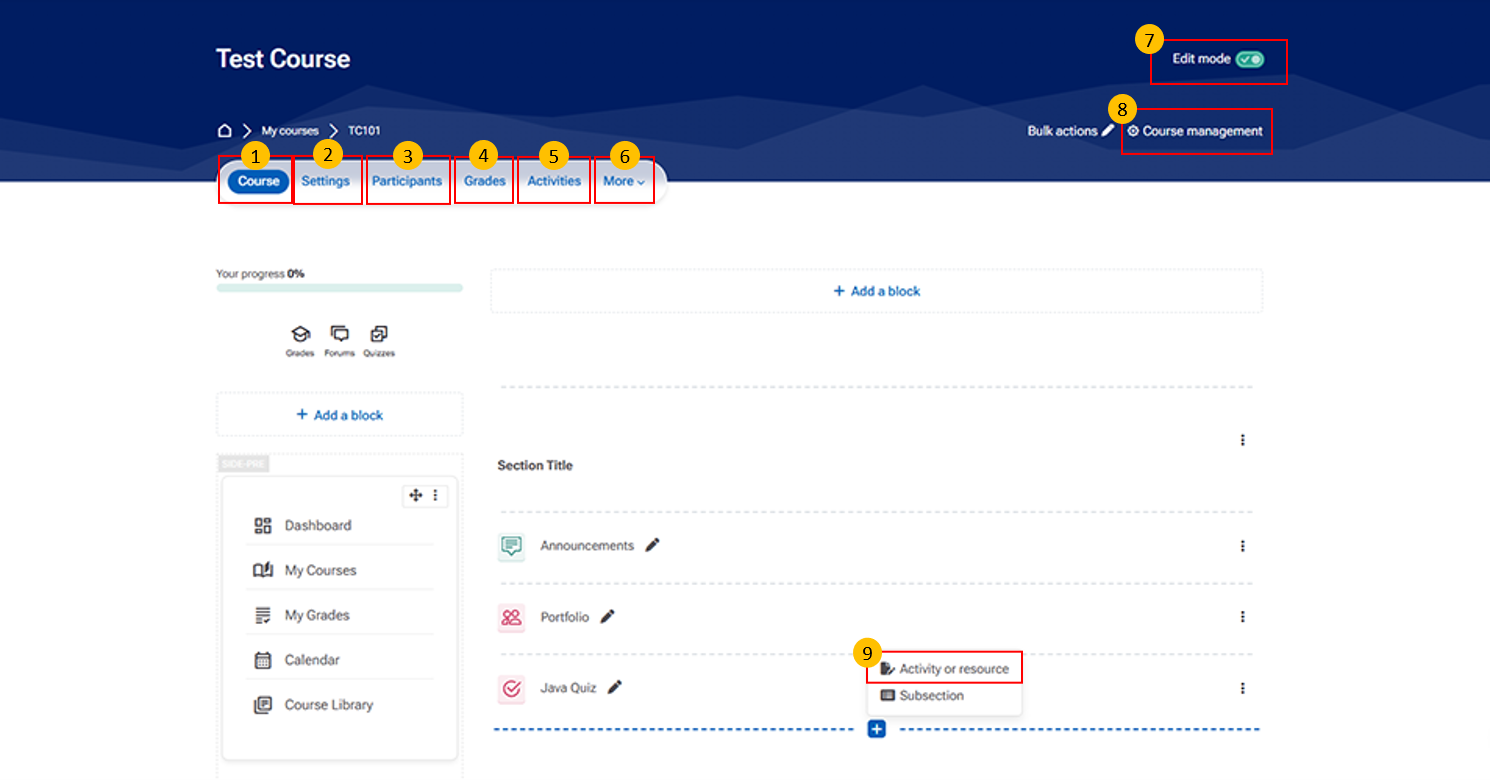
Use this tab to edit course details such as the course name, summary, enrolment methods, and other settings.
Grades Tab This tab provides access to the course gradebook.
It may include items such as:
Student grades for assignments and quizzes
Overall course performance
Options to export or configure grading methods.
Use this tab to view all course activities, including quizzes, assignments, and forums.
Use this tab to access additional course management options such as Reports, Competencies, and Course Reuse tools.
Use this option to enable or disable editing. Once enabled, you can add/remove sections, rearrange activities, and update labels and descriptions.
This section provides key administrative tools for managing and maintaining the course.
It includes important options such as:
Edit course settings – Modify course name, summary, and format
Participants – View and manage enrolled users
Enrolment methods – Add or manage user enrolment
Grades / Gradebook setup – Configure and manage grading
Reports – View course activity and participation reports
Question bank – Manage questions for quizzes and assessments
Use this option to add new activities or resources and create subsections to organize course content.